EPS 🖨

EPS (Encapsulated PostScript)

Open Beta
.eps · application/postscript

EPS é um formato vetorial profissional para produção gráfica e edição. Suporta cores CMYK e é ideal para gráficas e editoras.

Exportar EPS agora ✨ Beta Aberta — gratuito, sem limites

Principais características

Cores CMYK para impressão
Compatibilidade com PostScript
Gráficos vetoriais
Norma da indústria gráfica
Print-industry standard
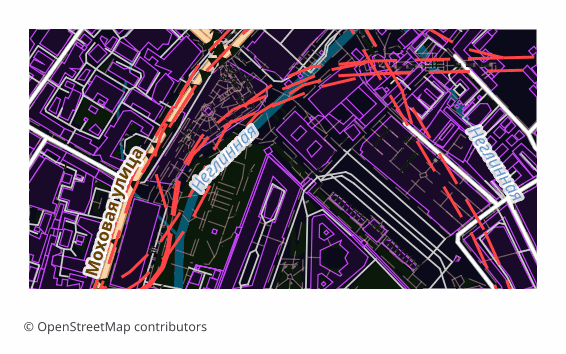
Example EPS export (central Moscow, 1x0.5 km)
Example: central Moscow, ~1×0.5 km, medium detail

Sobre o formato EPS

EPS (Encapsulated PostScript) is Adobe's vector format from the late 1980s, built on the PostScript page description language. It was conceived as an "embeddable picture" for layout work: the file carries its own BoundingBox and drops into an InDesign or QuarkXPress page as a finished object. Over three decades EPS became the common language of prepress — almost any print shop accepts it.

Maps are exported to EPS when they are meant to be printed rather than viewed on screen: a directions map in a booklet, a site plan on a poster, an inset in a travel guide, a background for a label. Vectors scale without any loss of quality, so the same file works for a business card and for a banner alike.

The output is a single .eps file: a map page assembled in a QGIS layout and translated into PostScript Level 3 through Ghostscript. Raster elements are rendered at 300 DPI, the default sheet is A4 landscape. PostScript has no transparency, so semi-transparent fills are converted in advance into the equivalent opaque color over the page background — the picture matches what you saw on screen, and the vector stays a vector.

Color arrives in the model the layout was built in, that is, in RGB. Conversion to CMYK, applying a print profile and setting up overprint happen later in prepress — in Illustrator, InDesign or Scribus, tuned to a particular print shop and paper.

Que programa abre ficheiros EPS

Os seguintes programas e aplicações podem abrir, editar e trabalhar com ficheiros EPS (Encapsulated PostScript) (.eps) exportados do OSM2CDR:

Adobe Illustrator 🎨CorelDRAW 💻QuarkXPress 📄Adobe InDesign 💻Scribus

Format specifications

Quem utiliza mapas EPS

🏗
Produção para impressão
A vector map for booklets, posters and handouts — it scales to any format without losing quality.
💻
Edição e publicação
Insets and directions maps for travel guides and textbooks: the file goes into the layout like an ordinary illustration.
📊
Publicidade
Site and object layout diagrams for outdoor advertising and printed announcements.
🎨
Tipografia
Print-ready vector that prepress departments accept practically everywhere.
🗺
Rótulos e embalagens
A map as part of a label or package design: a region outline, a plot plan, a route diagram.

Como exportar para EPS

1
Selecionar área
Desenhe um retângulo ou polígono no mapa interativo em osm2cdr.ru
2
Escolher EPS
Selecione EPS (Encapsulated PostScript) na lista de 127 formatos de exportação disponíveis
3
Exportar
Clique em Exportar e receba o seu ficheiro .eps em 1-5 minutos
4
Descarregar
Descarregue o ficheiro EPS pronto e abra-o no Adobe Illustrator

Como abrir depois da exportação

Mapas populares em EPS

Free

Obtenha exportações de mapas em EPS (Encapsulated PostScript)

Descarregue mapas profissionais em EPS a partir do OpenStreetMap. Geração instantânea, qualquer área.

Gratuito / exportação
Exportar EPS agora →

Perguntas frequentes

Qual é a diferença entre EPS e AI?
Posso abrir EPS em software gratuito?
Does the file contain object names?
Why does EPS arrive in RGB rather than CMYK?
At what resolution are raster elements printed?
Why do semi-transparent fills look denser than on screen?
EPS or PDF for the print shop?

Comparar com outros formatos

Formatos relacionados

Frequentemente exportados em conjunto

Related Articles