
EPS (Encapsulated PostScript)
Price before paymentEPS je profesionálny vektorový formát pre tlačovú produkciu a vydavateľstvo. Podporuje farby CMYK a je ideálny pre tlačiarne a vydavateľstvá.
OpenStreetMap data as of 5 October 2026 · 23 days ago
Kľúčové vlastnosti
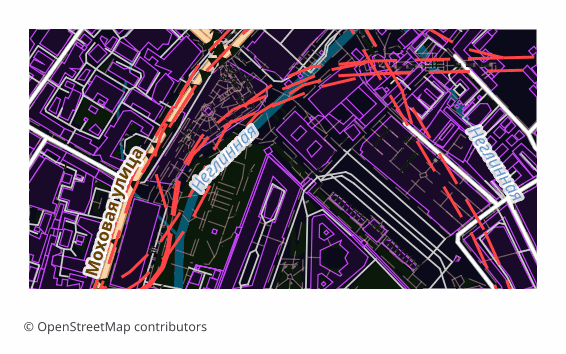
O formáte EPS
EPS (Encapsulated PostScript) is Adobe's vector format from the late 1980s, built on the PostScript page description language. It was conceived as an "embeddable picture" for layout work: the file carries its own BoundingBox and drops into an InDesign or QuarkXPress page as a finished object. Over three decades EPS became the common language of prepress — almost any print shop accepts it.
Maps are exported to EPS when they are meant to be printed rather than viewed on screen: a directions map in a booklet, a site plan on a poster, an inset in a travel guide, a background for a label. Vectors scale without any loss of quality, so the same file works for a business card and for a banner alike.
The output is a single .eps file: a map page assembled in a QGIS layout and translated into PostScript Level 3 through Ghostscript. Raster elements are rendered at 300 DPI, the default sheet is A4 landscape. PostScript has no transparency, so semi-transparent fills are converted in advance into the equivalent opaque color over the page background — the picture matches what you saw on screen, and the vector stays a vector.
Color arrives in the model the layout was built in, that is, in RGB. Conversion to CMYK, applying a print profile and setting up overprint happen later in prepress — in Illustrator, InDesign or Scribus, tuned to a particular print shop and paper.
Aký program otvára súbory EPS
Nasledujúce programy a aplikácie dokážu otvoriť, upraviť a pracovať so súbormi EPS (Encapsulated PostScript) (.eps) exportovanými z OSM2CDR:
Format specifications
- Open standard
- 2D only
- Lossless (no quality loss)
- No attributes
- Output: 1 file
- Encapsulated PostScript (Ghostscript eps2write) in RGB — the conversion to CMYK is a prepress step. Labels arrive as Type 3 bitmap glyphs, not editable text, which makes the file markedly heavier than PDF — take PDF or AI if the text must stay editable. Opens in Illustrator, CorelDRAW, Inkscape.
Kto používa mapy EPS
Ako exportovať EPS
Ako súbor otvoriť po exporte
- Adobe Illustrator — File → Open; the map opens as an editable vector, and from there you can edit labels and add your own graphics.
- CorelDRAW — Import (Ctrl+I); if it matters that label typefaces stay exactly as they are, choose the option that imports text as curves.
- InDesign, QuarkXPress, Scribus — don't "open" it, Place it on the page: EPS lands as an illustration with its own BoundingBox and does not disturb your layout.
- Inkscape (free) — opens EPS if Ghostscript is installed on the system; if it isn't, it is easier to download SVG or PDF from us — the content is exactly the same.
- Before sending to a print shop — convert the document to CMYK and check with your printer about the profile, the resolution of raster inserts and overprint requirements: inside the EPS itself the colors stay as the layout was built.
Obľúbené mapy vo formáte EPS
Získajte mapové exporty vo formáte EPS (Encapsulated PostScript)
Stiahnite si profesionálne mapy EPS z OpenStreetMap. Okamžité generovanie, ľubovoľná oblasť.
Často kladené otázky
Porovnanie s inými formátmi
Convert to EPS and back
EPS guides and tutorials
Súvisiace formáty
Často exportované spolu
Related Articles
EPS — Encapsulated PostScript: Maps for Old-School Print Workflows
Deep guide to EPS: PDF's predecessor from Adobe, versions 1.2-3.0 since 1987, how to make an EPS map from OpenStreetMap
tutorialExport OpenStreetMap to Illustrator: a clean vector map in a couple of minutes
How to get an OpenStreetMap map into Adobe Illustrator as real vectors: which format to download, how to open it, and wh
comparisonWhich Map Format to Choose for Print and Design: PDF, SVG, AI, EPS, CDR
Decision tree for choosing an OSM map format for design and typography print: PDF, SVG, AI, EPS, CDR, PNG, TIFF. Step by