
Adobe Photoshop PSD
Open BetaPSD ni umbizo asilia la Adobe Photoshop lenye usaidizi wa tabaka. Ramani huhamishwa ikiwa na tabaka tofauti za barabara, majengo, maji, na lebo. Linafaa kwa usanifu wa grafiki na uchakataji wa baadaye.
OpenStreetMap data as of 24 August 2026 · 46 days ago
Vipengele Muhimu
Kuhusu Muundo wa PSD
PSD is the native format of Adobe Photoshop: a raster image split into layers with transparency. It is opened not only by Photoshop itself — Affinity Photo, GIMP, Krita and the browser-based Photopea read PSD with its layers and let you work with each of them separately.
A map is exported to PSD when it will be drawn on rather than calculated with: a poster, a cover, an infographic, a presentation background, an illustration for a publication. Layers let you recolor the water, mute the buildings, hide the labels and add your own — without touching the rest of the map.
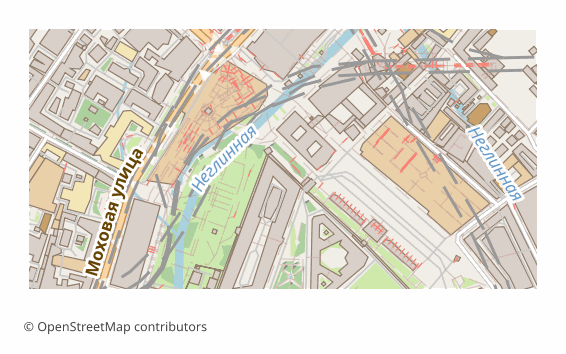
What is inside: five thematic layers, bottom to top — Water, Green areas (greenery and land use), Buildings, Roads (roads, rails, transport), Labels (captions and names). Each one is drawn on a transparent background, so the lower ones show through the upper ones. The sheet is 297x210 mm at 300 DPI by default, and the image side is capped at 6000 pixels so the file stays openable.
Worth knowing up front: the layers are raster — pixels, not editable vector outlines, so you cannot drag a node of a road. For vector editing take SVG or PDF. And one more thing: if the layer assembly library is unavailable on the server, you will get the same sheet as a single layer — the map is the same, it is just not split into layers.
Programu Gani Hufungua Faili za PSD
Programu na programu-tumizi zifuatazo zinaweza kufungua, kuhariri, na kufanya kazi na faili za Adobe Photoshop PSD (.psd) zilizosafirishwa kutoka OSM2CDR:
Format specifications
- Proprietary format
- 2D only
- Lossless (no quality loss)
- No attributes
- Output: 1 file
- Adobe Photoshop .psd, layered raster. Each map layer rasterised to a separate Photoshop layer. Opens in Photoshop, GIMP, Affinity Photo.
Nani Hutumia Ramani za PSD
Jinsi ya Kusafirisha PSD
Jinsi ya Kufungua Baada ya Kuhamisha
- Adobe Photoshop — File > Open; the Water, Green areas, Buildings, Roads and Labels layers will appear in the Layers panel, and each one can be recolored, hidden and blurred separately.
- Affinity Photo — opens PSD with layers natively, bought once and without a subscription.
- GIMP (free) — File > Open, the layer structure is preserved; saving back to PSD is done through File > Export As.
- Photopea — works right in the browser, its interface is close to Photoshop: drag the file into the window, nothing to install.
- If you need vector editing — download the same map as SVG or PDF: there roads and buildings stay curves, while in PSD they are already pixels.
Ramani maarufu katika PSD
Pata usafirishaji wa ramani za Adobe Photoshop PSD
Pakua ramani za kitaalamu za PSD kutoka OpenStreetMap. Uzalishaji wa papo hapo, eneo lolote.
Maswali Yanayoulizwa Mara kwa Mara
What people who already downloaded say
Reviews are quoted in the language their authors wrote them in.
Наконец-то карты можно скачать в векторе. Автору спасибо!
всё очень круто, не ожидал что просто приду и скачаю кусочек карты! спасибо!!!
ОГРОМНОЕ СПАСИБО!!! ОЧЕНЬ ХОРОШАЯ ПРОГРАММА!!! Искал карту в векторе на стыке 3 стран - очень помогло!!
Ты - молодец! Сделал большое и нужное дело!
Иван, спасибо огромное! Не просто человек - Человечище!
иван, вы просто чудо. Спасибо за неимоверно крутой сервис
Miundo Inayohusiana
Husafirishwa Pamoja Mara kwa Mara
Related Articles
OpenStreetMap in Photoshop: a map in PSD with layers, not a screenshot
A map screenshot in Photoshop isn't editable — roads, water and buildings are flattened into one raster. The fix: downlo
formatPSD (Photoshop Document) format: cartographic editorial — OSM export for print graphics
PSD from Adobe 1990: layered raster, blend modes, smart objects, .psd vs .psb, cartographic editorial pipeline.
tutorialMaps in Photoshop: Creating Art Posters from OpenStreetMap
How to create an art poster from an OSM map in Photoshop. PSD import with layers, color grading, effects, and A3/A2 prin