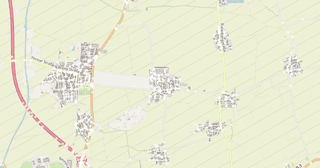
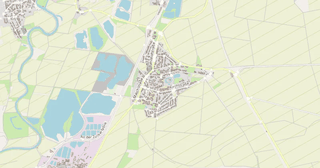
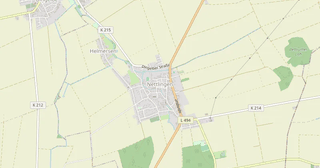
Map of Heinde in DGN format
OpenStreetMap ડેટામાંથી બનેલો નકશો, ડાઉનલોડ માટે તૈયાર
નકશો કસ્ટમાઇઝ કરો
આ સ્થળનો વિસ્તાર કન્સ્ટ્રક્ટરમાં ખોલો અને બધું તમારી જરૂરિયાત પ્રમાણે ગોઠવો
કન્સ્ટ્રક્ટરમાં ખોલો →નકશા પાસપોર્ટ
આ નકશામાં મૂળભૂત રીતે શું છે
આ રીતે નકશો "જેવો છે તેવો" બને છે — દરેક સેટિંગ કન્સ્ટ્રક્ટરમાં બદલી શકાય છે.

DGN વિશે
Heinde નો નકશો DGN માં — પસંદ કરેલા વિસ્તાર માટે વાસ્તવિક OpenStreetMap ડેટાની નિકાસ.
DGN is the Bentley MicroStation format for infrastructure design. Standard for road and bridge engineering.
ફાઇલમાં કયા સ્તરો છે
પસંદ કરેલા વિસ્તાર માટે આ ફાઇલમાં સમાવિષ્ટ છે:
- રસ્તાઓ
- ઇમારતો
- પાણી
- હરિયાળી
- રસપ્રદ સ્થળો
નિર્દેશાંક પ્રણાલી
WGS 84 (EPSG:4326), વિઝાર્ડમાં પસંદ કરી શકાય
સુસંગતતા
એકમો
મીટર (પસંદ કરેલી નિર્દેશાંક પ્રણાલીમાં પ્રક્ષેપિત)
| શ્રેણી | GIS |
| ફાઇલ એક્સટેન્શન | .dgn |
| સ્તર | Open Beta |
What's in the DGN map of Heinde
771 buildings (133 residential, 6 industrial, 2 religious), 23.6 km of roads, 63 points of interest, 6 landmarks.
The area covers 3.1 km², with about 246 buildings per km².
Mostly secondary roads 7.1 km, residential streets 5.6 km, tertiary roads 3.9 km.
The map marks 6 water bodies.
Key amenities: schools — 2, kindergartens — 2, fire stations — 2.
Public transport: 6 bus stops.
Main streets: Hauptstraße, Mittelstraße, Hildesheimer Straße, Sonnenberg, Mühlenweg
Landmarks: Carl Huter, Kriegerdenkmal, St. Bernward, Evangelische Kirche Heinde, Kapelle
Heinde માટે DGN કેવી રીતે વાપરવું
- મુખ્ય પૃષ્ઠ પર Heinde નકશા વિસ્તાર પસંદ કરો
- DGN ફોર્મેટ પસંદ કરો અને નિકાસ સેટિંગ્સ ગોઠવો
- નિકાસ પર ક્લિક કરો અને પ્રક્રિયાની રાહ જુઓ
- ફાઇલ ડાઉનલોડ કરો અને તમારી એપ્લિકેશનમાં વાપરો
આ ડ્રોઇંગ કેવી રીતે ખોલવું. એકમો: મીટર (પ્રક્ષેપિત કોઓર્ડિનેટ્સ, ડિગ્રી નહીં). ડ્રોઇંગ ખાલી લાગે તો પણ તે ખાલી નથી: Zoom Extents (બધું બતાવો) ચલાવો, નકશો દેખાશે. AutoCAD: ZOOM → E.